Introducing Solvionyx OS: Aurora Series, Version 11
We're excited to open the first public release of Solvionyx OS — a Debian-based Linux distribution built by Solviony, designed to feel like a complete, cohesive product rather than a pile of default GNOME settings. This is the Aurora Series, and it's the culmination of everything we've been building: a custom desktop experience, a local-first AI assistant, an integrated app store, full-disk encryption, and a real update mechanism that ships through a signed apt repository — no ISO reinstalls required to stay current.
Here's what's in the box, and why we built it this way.
A desktop that actually looks finished
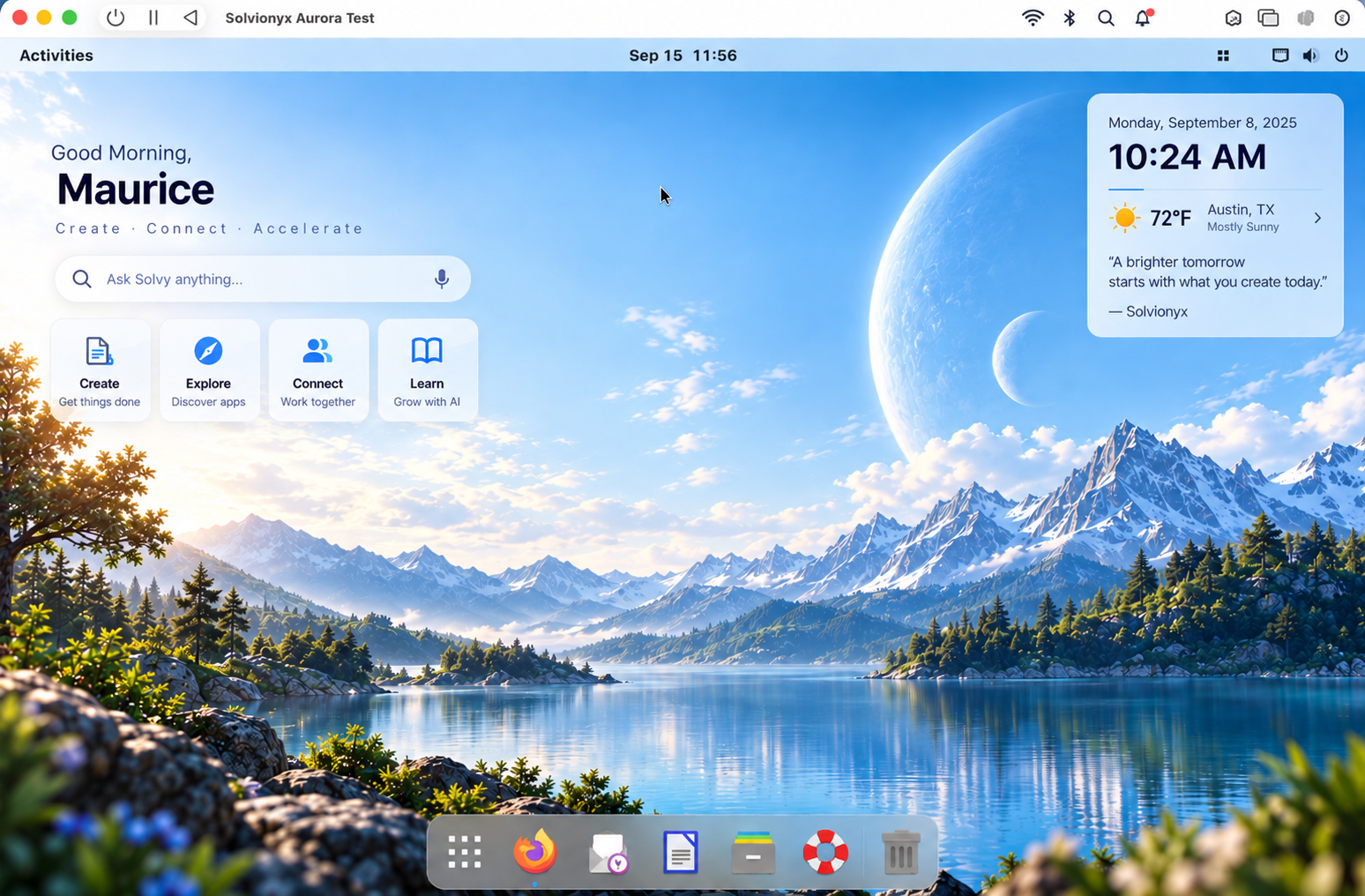
The Aurora desktop is a from-scratch visual language layered on top of GNOME 43 — a custom GTK theme, icon set, wallpaper, and shell extensions, tuned against real sampled color data rather than guessed at. The login screen, lock screen, and desktop all share the same theme (getting that consistent required tracking down a real GNOME quirk: the stock "User Themes" extension doesn't declare support for the greeter session by default, so most distros that skin GNOME never actually get their theme onto the login screen. Ours does.)
Under the hood it's still GNOME, which means it's fast, stable, and familiar — but the visual identity is unmistakably Solvionyx.
Solvy: an AI assistant that lives on your desktop
Solvionyx OS ships with Solvy, a built-in AI assistant available from the tray, a quick-ask dialog, or by voice ("Hey Solvy"). Solvy runs as a lightweight per-user service, authenticates through your Solviony ID, and talks to Solviony Cloud by default — no API key required to get started, though bring-your-own-key is supported if you'd rather use your own OpenAI or Gemini account.
Solvy isn't just a chat window. It can open URLs, check system information, and launch installed applications on your behalf, all through a locked-down allowlist of actions — it never executes arbitrary commands or shells out based on what a model generates. Ask it what's using your memory, ask it to open a website, or just ask it a question — it responds out loud too, with a chime to confirm it heard the wake word and is listening.
The Solvionyx Control Center
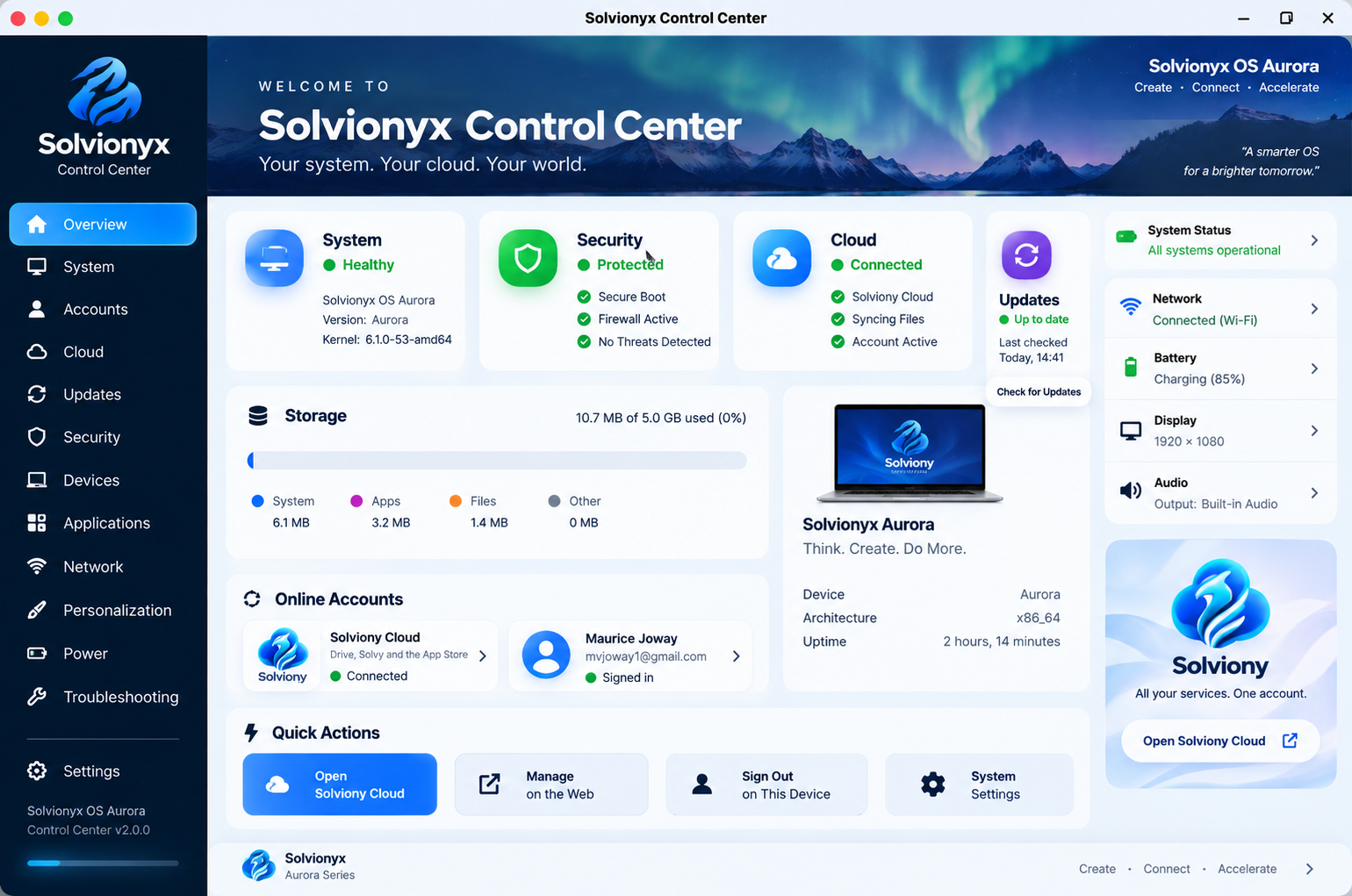
This is home base for the whole system: a single dashboard showing your Solviony ID and Cloud account status, storage usage, system updates, firewall status, and quick access to network, power, and personalization settings. Everything that used to require hunting through separate settings panels now lives in one place, styled to match the rest of Aurora.
From here you can see at a glance whether you're signed in, how much of your Solviony Cloud storage you've used, whether updates are available, and whether the firewall is active — all real, live status, not placeholders.
Solviony App Store, with Labs built in
The native Solvionyx App Store handles installs through PackageKit under the hood (so you get the same safety and permission model as any package manager), with a redesigned browsing experience: featured apps, categories, collections, and update tracking. It also surfaces apps published through Solviony Labs — independent developers' apps distributed outside the standard apt repository — right alongside everything else, so there's one place to discover and install software.
Solviony Cloud and the Vault
Sign in once with your Solviony ID and you get Cloud storage integration across the system — browse your Drive from the Files app, see your storage plan and usage in the Control Center, and sync devices. For anything you'd rather the cloud never be able to read, the Vault encrypts files on your machine with AES-256-GCM before they ever leave it, using a passphrase that's never transmitted. Solviony Cloud stores only ciphertext.
Full-disk encryption
The installer now offers full-disk encryption at setup time — check the box, set a passphrase, and your root filesystem is protected behind LUKS from the very first boot. Combined with the Vault for cloud data, you get encryption at rest on the device and encryption in transit and storage for anything synced to Solviony Cloud.
Gaming Edition
For anyone who wants Solvionyx OS on a gaming rig, Gaming Edition adds Steam, OBS Studio, GameMode, MangoHud, Vulkan tooling, and Proton support — either pre-installed on a dedicated ISO, or added to any existing Solvionyx install with a single apt install solvionyx-gaming. A built-in readiness check (solvionyx-gaming-check) verifies your GPU, drivers, and renderer are actually set up correctly before you go looking for why a game won't launch.
Updates that just work
Solvionyx OS ships through a signed apt repository, the same way any other Linux distribution does. Once installed, updates arrive the way you'd expect — apt update && apt upgrade, or through the graphical update manager in the Control Center. No more downloading a new ISO and reinstalling to get the latest fixes.
Getting started
Solvionyx OS Aurora is available now as a downloadable ISO, or via the apt repository if you're setting up a fresh Debian-based system. Before installing, you'll be asked to agree to our End User License Agreement, which covers the OS itself (GPLv3) and the optional Solviony online services. Full installation steps, release notes, and download links are on the Solvionyx OS product page.
One thing worth calling out for anyone installing on physical hardware: after the installer finishes and prompts you to restart, make sure to remove the installation USB or disc before the reboot — otherwise the machine will boot back into the installer instead of your new system.
This is a first public release, and we're actively working through feedback as real installs happen on real hardware. If you run into anything, or just want to see what's next, reach out through our contact page — we'd love to hear from you.
Welcome to Solvionyx OS. Welcome to Aurora.